
Create Issues from Discord
Ever had a brilliant idea or spotted a pesky bug mid-conversation on Discord? No need to jump over to Jira - you can quickly create issues right from your Discord chat!
The fields shown below are the default ones. Your admin can customize which fields appear in the /create command and the modal. See Issue Creation Parameters.
📋 Before You Start: Your admin must enable issue creation for your project. You may need to connect your Discord account to create issues under your name.
📝 Creating an Issue from Discord
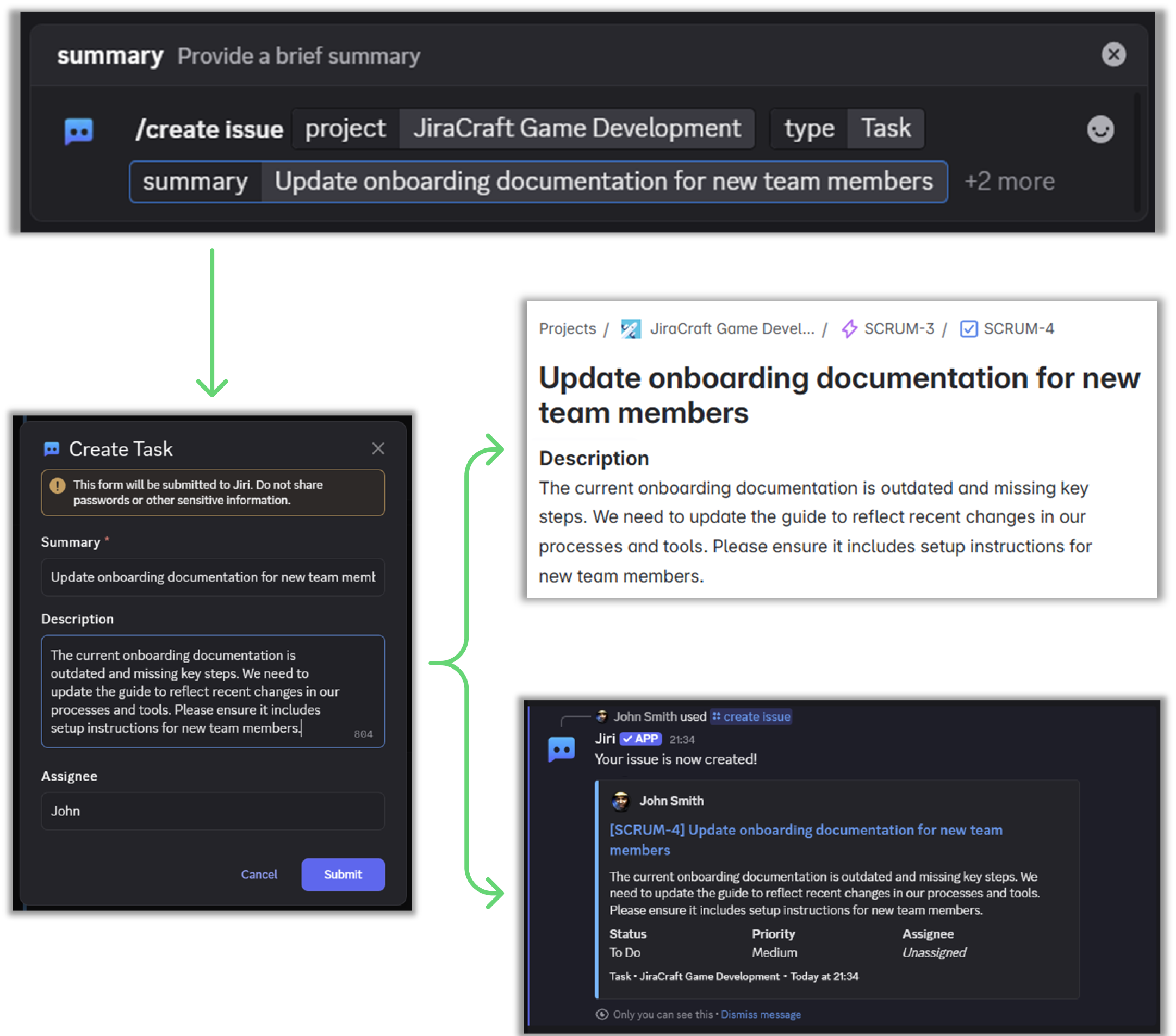
Type /create in any Discord channel linked to Jira. By default, you'll get a simple prompt asking for a few details:
- Project: Select your Jira project from the dropdown.
- Issue Type: Choose what fits best (Bug, Task, Story, etc.).
- Summary: Write a short, clear title.
- Priority (optional): Set urgency.
- Assignee (optional): Enter the Jira user's display name (not their Discord name!).
Next, you'll see a handy Discord modal:
- Quickly double-check your details and optionally add an issue description for clarity.
💡 Quick tip: Your admin can change which fields appear in the command and in the modal. See Issue Creation Parameters.
Hit Submit - and voilà, your Jira issue is live!
🚨 Quick Tips
- Use Tab and Arrow Keys to move swiftly between fields.
- Priority and Assignee are optional, but they help your team prioritize work effectively.
- Remember, the Assignee field expects a Jira user's name, not a Discord username.
🧭 Quick troubleshooting
-
Creating Jira issues not enabled
- Ask your Jira project admin to enable the "/create issue" command: Project settings → Apps → Discord → "/create issue command permission". See Bot Permissions.
-
Creating issues as guest not enabled
- Either connect your account (see the User Guide) or ask the admin to allow guests by setting "/create issue" to "All Discord server users" in Project settings → Apps → Discord.
-
You do not have permission to create issues in the connected projects
- Ask your Jira admin to grant you the "Create Issues" permission in the target project (Project settings → Permissions).
-
The app does not have permission to create issues in the connected projects
- Ensure the app has the required project permissions (add
atlassian-addons-project-accessto the appropriate permission). See Fixing Project Permissions.
- Ensure the app has the required project permissions (add
❓ Stuck?
Got questions or just want to chat? Visit our Discord for Jira Community - we love hanging out and helping users just like you!