
Restore Ticket Automation
Open Ticket Automation in the project's Discord for Jira settings, or select Tickets in General Settings. Follow the recovery steps for the message shown there. Existing settings are preserved, and you can still disable automation while resolving the problem.
If a Discord user sees “This ticket wasn’t created. Please ask a server admin for help.”, a server administrator should check this page in Jira. The Discord message does not establish that the user needs an access grant.
Jira Service Management is not licensed on this site
Jira reports that the site's Jira Service Management instance is not licensed. Ticket Automation cannot be set up or used until that licensing problem is resolved. An existing service project or Service Desk Team membership does not establish an active JSM license.
- Ask your billing administrator to open Atlassian Billing and find this site's Jira Service Management subscription.
- If the subscription is inactive, follow Atlassian's subscription reactivation steps.
- If the subscription is already active, contact Atlassian Support and report that Jira says the site is not licensed.
- After resolving the license, return to Ticket Automation and select Check again.
This message does not identify whether a subscription expired, was cancelled, or has a billing problem. Your billing administrator can check the subscription details.
Could not check the Jira Service Management license
Jira did not return a usable licensing result. Setup and configuration saves are paused until the check succeeds. This message does not mean the subscription is inactive.
Select Check again. If the check keeps failing, contact Discord for Jira support with the visible error details, Jira site and project key. General Features and disabling existing Ticket Automation remain available.
Restore product access through the reported group
Use these steps only when Ticket Automation specifically reports Jira Service Management product access missing. DFJ shows this recovery path after confirming that the site is licensed and that the app user is missing JSM product access.
An organization administrator or a user access administrator for Jira Service Management can restore product access. A project administrator who cannot manage it should send the reported group name to one of those administrators.
The error in Jira lists the groups that currently contain the Discord for Jira app user. Use one of the listed group names in the steps below.
The app user can remain a member of one of these groups even after Jira Service Management product access is removed from the group. Restore the Jira Service Management User (agent) role for the appropriate reported group.
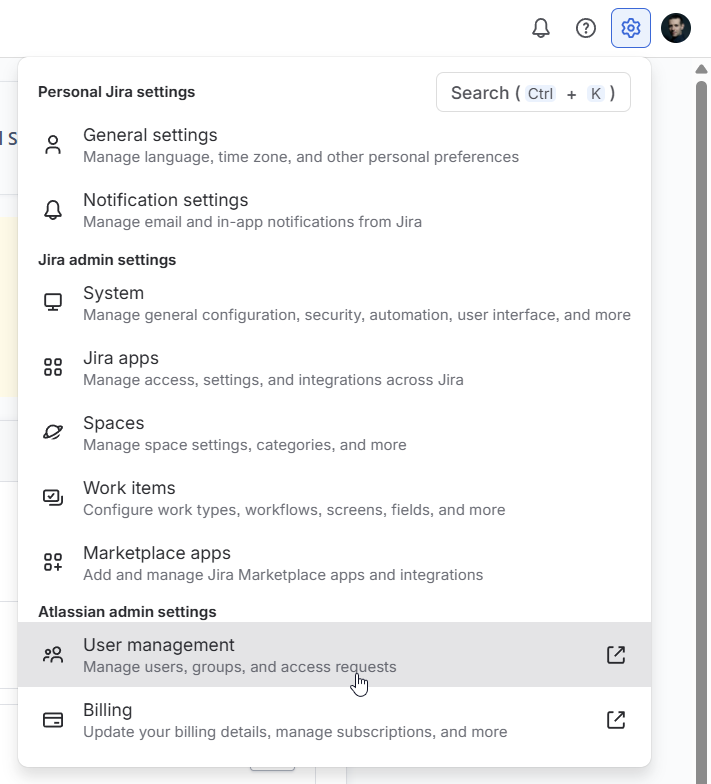
- In Jira, open Settings, then select User management.
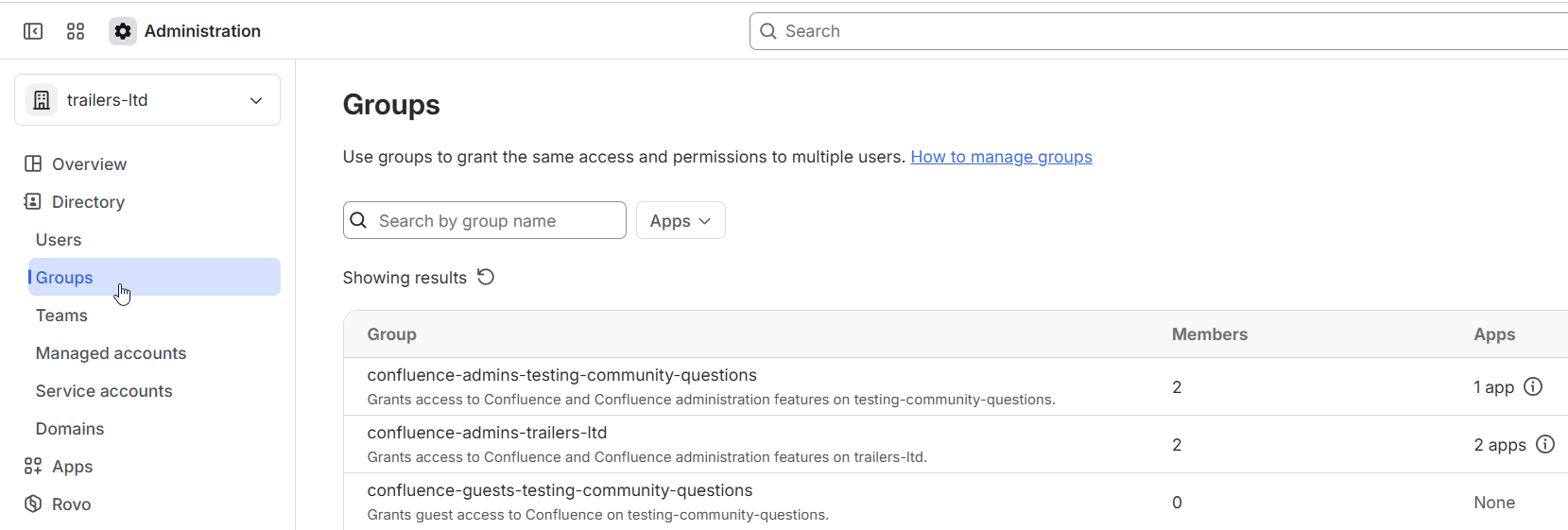
- In Atlassian Administration, select the organization, then Directory and Groups.
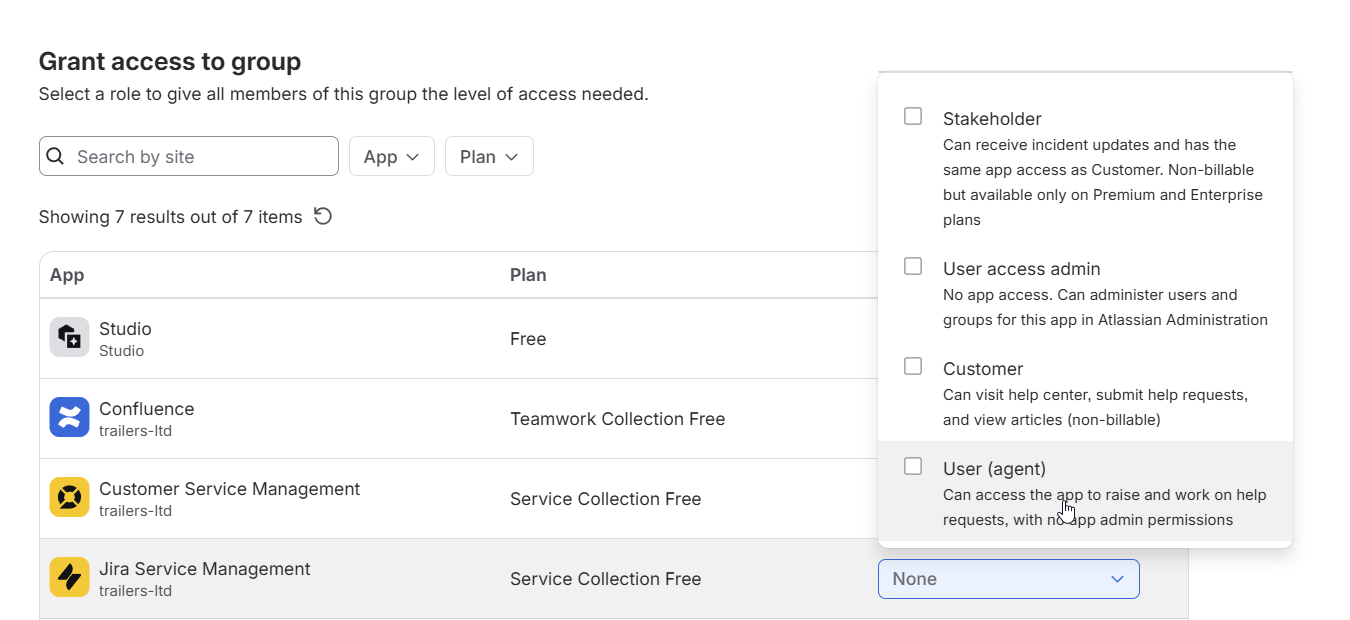
- Open the group shown in the Ticket Automation error, then select Grant access.

- For Jira Service Management, choose the User (agent) role, then confirm.
- Return to Ticket Automation in Jira and select Check again. Confirm that ticket forms load before trying ticket creation again.
For Atlassian's current administration steps, see Give users access to apps.
Jira denied access to ticket forms
Ask a Jira administrator to check the app's access to the affected service project. If the page does not specifically report missing product access, it has not established that a group needs a new grant. Contact Discord for Jira support with the visible Jira error, site and project key if access remains denied.
Creating a ticket from someone else's message is still blocked
Once Ticket Automation is available, Jira must separately confirm the linked requester's effective agent permission for the target project. Site licensing, app-user access and project role membership do not replace that check.
If ticket forms load but this action remains blocked, contact Discord for Jira support with the Jira site, project key and the time of the failed Discord action. A rejected permission check is a configuration diagnosis to investigate, not a reason to bypass authorization. For an explicit agent-access denial, follow Fix agent access.