
Discuss Jira Issues
📋 Before You Start:
- Your Jira project is already connected to Discord
- You're part of the Discord server linked to Jira
Ever wanted to quickly chat with your team about a Jira issue without switching apps? Great news—now you can discuss Jira issues directly in Discord!
💬 Step 1: Enable Issue Discussions
- Navigate to your Jira project.
- Click on Project settings → Apps → Discord.
- Under Issue Discussions, flip the toggle to enable discussions.

🔗 Step 2: Start a Discussion from Jira
To start chatting about an issue:
- Open a Jira issue.
- Scroll down and click the Discuss in Discord button.

- A popup will appear:
- Choose your Discord server and channel.
- Enter a thread name (or stick with the default).
- Click Create Thread.
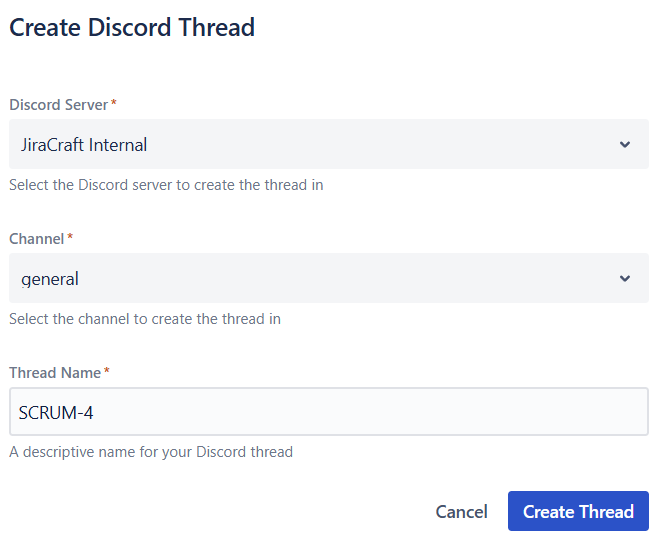
You must be a member of the selected Discord server to create a discussion thread. If you see an error that says you are not a member of the Discord server, join the server and try again.
🔗 Link an existing Discord thread (optional)
If the discussion already exists in Discord, you can link it instead of creating a new thread:
- Open the Jira issue.
- In the Discord panel, click Link Discussion Thread.
- Paste a Discord thread link or raw thread ID. The dialog auto-selects the server, channel, and thread.
- If you paste a raw thread ID and multiple servers are connected, pick the server first.
- Click Link Thread.
🎯 Step 3: Jump into the Discussion
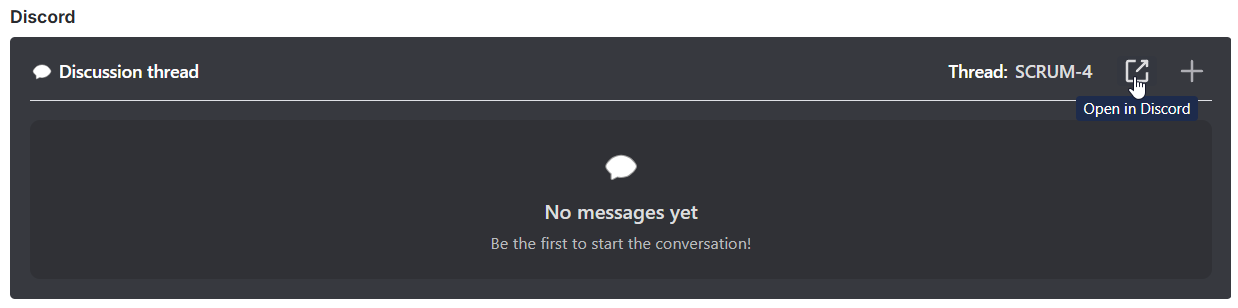
Once created, the discussion thread appears directly in Jira:
- Click Open in Discord to jump straight into your Discord conversation.
📢 Step 4: Chat Away in Discord
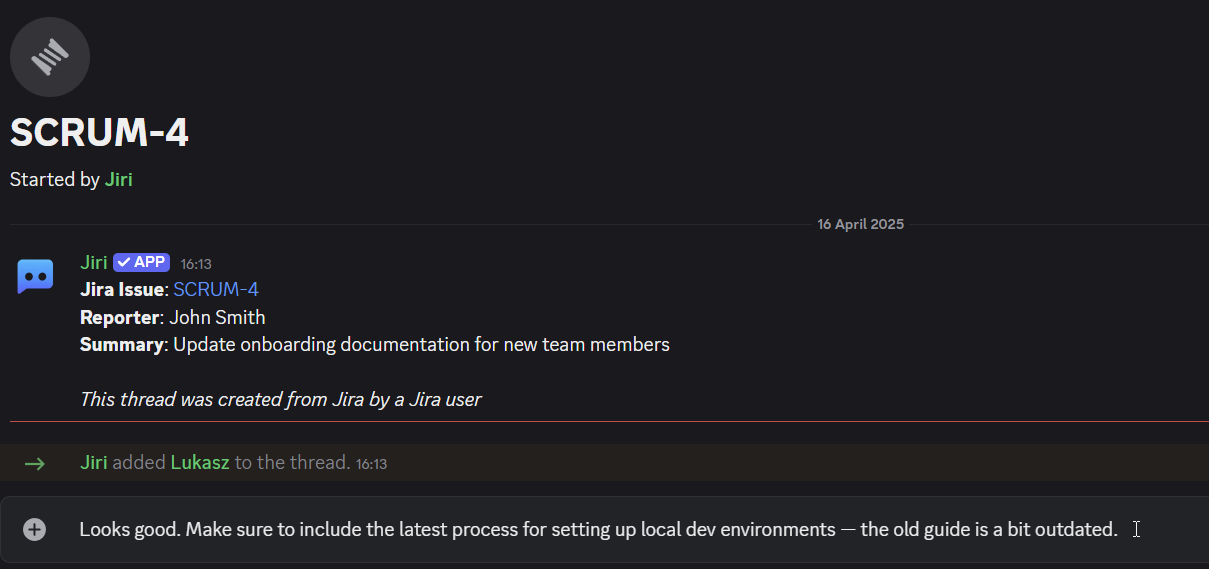
Now you're in Discord:
- View issue details instantly.
- Mention teammates, discuss solutions, and exchange ideas.
- Any messages sent here automatically sync back to Jira, keeping everyone aligned.
🔄 Keep Discussions Updated
Want to add another topic or discuss another issue?
- Click New Thread in Jira, repeat the steps above, and easily maintain multiple discussions organized by issues.

🧵 Auto-threads from notifications
Prefer threads to open automatically when an issue is first posted to Discord? You can enable per‑issue threads directly in a notification rule.
Enable auto-threads
- Open your notification rule.
- Go to Where to Send → Advanced Delivery Options.
- Turn on Send notifications to Discord threads.
How it works:
- The first message about an issue opens a thread named after the issue (e.g.,
ABC-123). - Later updates for that issue are posted inside the same thread, keeping the main channel tidy.
💡 Quick tip: In Jira Service Management projects, you can also display the thread link using the Ticket Thread field in notification content.
Manual vs Auto threads (quick compare)
| Aspect | Manual (from Jira) | Auto (from notifications) |
|---|---|---|
| Who triggers | A user clicks Discuss in Discord | The bot creates a thread on the first notification |
| Where it appears | Channel and thread you choose in the dialog | Channel set in the notification rule |
| Best for | Ad‑hoc conversations on specific issues | Continuous updates grouped by issue, low channel noise |
🛠️ Quick Tips
- Clear naming helps your team quickly spot relevant discussions.
- Use mentions in Discord to loop in the right people swiftly.
🧑🚒 Troubleshooting
Issues with threads or messages?
- Verify Jiri bot permissions in Discord.
- Ensure Issue Discussions are enabled in Jira settings.
If you see "server removed", the Discord server is no longer connected to the app. If you see "no access", the bot does not have permission to view the channel or thread. If you see "deleted", the thread was removed in Discord.
Still stuck? Visit our Discord for Jira Community—we’re here to help!
Happy discussing! 💬