 Discord for Jira
Jira site or project admin · Discord member
Create Jira issues from Discord with a custom command
Set up a command such as /report-bug that opens a form for a new Jira issue.
Configure the form
- Open Commands and select New issue creation command. Use the suggested Create issue name and
/create-issuecommand, or edit either value. - Set a project and issue type, or let members choose in Discord. Then add the fields you need. Keep Summary required and use fixed values for supported fields that should be filled in automatically.
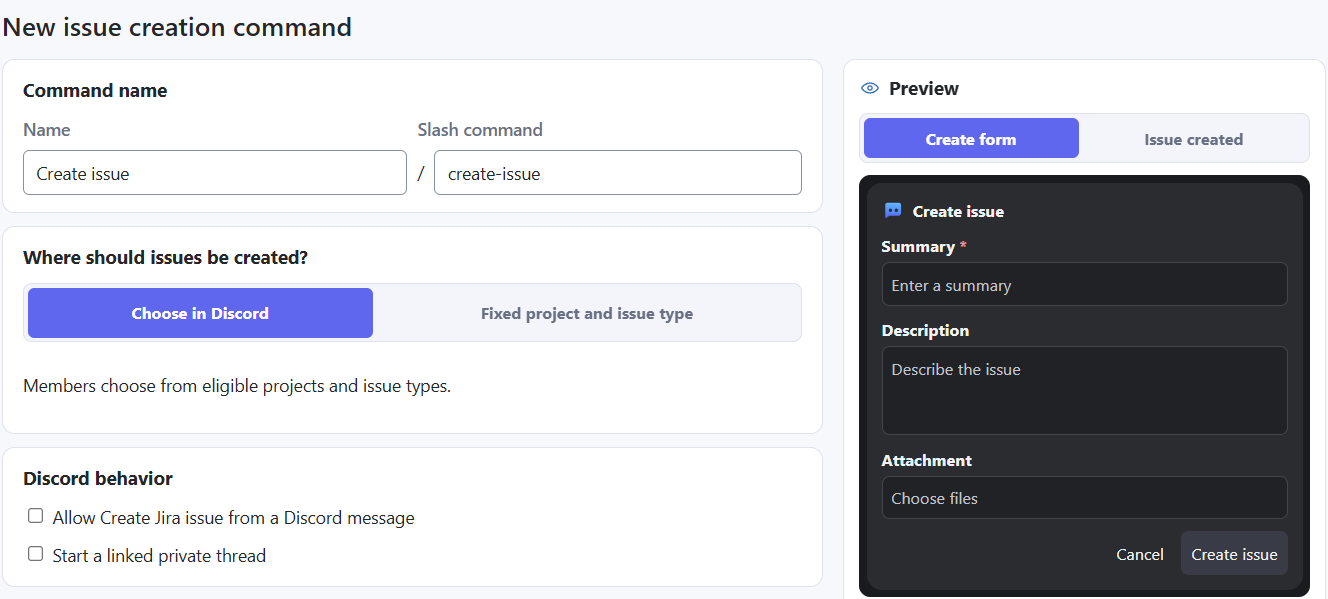
Turn on Allow Create Jira issue from a Discord message if people should be able to start this form with Apps → Create Jira issue. A project can allow guest issue creation from slash commands and panels. Link a Jira account to use permitted private issue actions or linked private discussions.
Check Create form and, when available, Issue created in the preview. Select Save issue creation command.
- Fixed destinationOpen the form for the configured Jira project and type.
- Member choiceAsk for a project or type when several are eligible.
Open the form in Discord
| Situation | What you see |
|---|---|
| Destination known and form prepared | The form opens. |
| More than one project or issue type is available | Choose a project or issue type. |
| Form takes longer to prepare | Select Open issue form in the private reply. |
After you submit the form, open the Jira issue from the confirmation.